
Antigravity's Auto Mode: The Hard Part Isn't Full Automation—It's Knowing Where to Stop
Google Antigravity isn't chasing a smarter 'full auto' switch. It's building layered control: multi-select questions, review policies, auto permissions, a hard stop in /plan, Shift-Tab and rules in the CLI. The article then maps the four entry points—App, CLI, IDE, and SDK—along with macOS and Windows sandboxes, permission rules, Git worktrees, /learn, and scheduling automation, using demos and audience Q&A to show how auto mode can move fast without giving up judgment.

Antigravity's Auto Mode: The Hard Part Isn't Full Automation—It's Knowing Where to Stop
At a recent Antigravity session, someone asked a very practical question: auto mode does save effort, but the agent sometimes starts acting without confirmation. Yet if it stopped to ask me at every step, I'd become the bottleneck for the whole workflow.
That tension is common when you use agents to write code. Our answer isn't a smarter "full auto" switch; it's to split control into several layers: when the agent asks, when it stops, which surface it runs on, what environment it runs in, and how a single conversation becomes a repeatable process. Some of what follows is already available; some is still in progress.
The Key to Auto Mode Is Knowing When to Stop
Start with the most direct layer: questions and review.
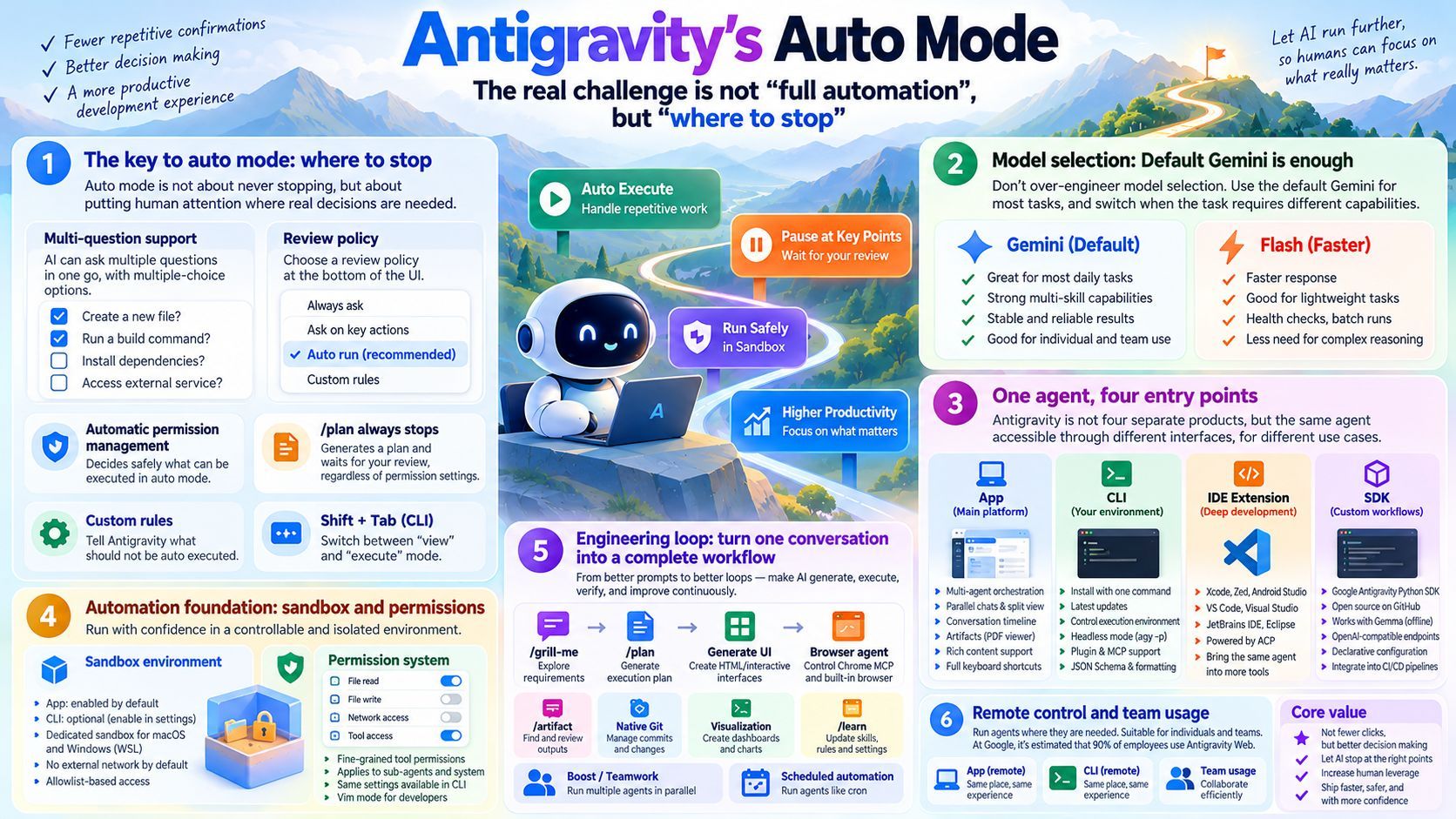
We recently added multi-select support, so the agent can dynamically ask several questions at once. At the bottom of the question screen, you can choose the review policy type you've already configured. On permissions, Antigravity now supports an auto mode that lets the agent decide whether a command is safe to run. In the App, all operations run in a sandbox by default; if the agent is only reading files in its own directory and not touching the network, it doesn't need your approval. Auto mode can substantially reduce the total number of approval requests you have to handle.
But "auto" doesn't mean "it never stops." In the CLI, you can use Shift-Tab to switch between viewing and executing. /plan is a harder example: whatever your permission settings, it produces a plan review after execution and deliberately stops to wait for your input. You can also use rules to tell Antigravity when not to execute automatically. Permission settings are project-wide, not something you re-explain in every conversation.
That's why multi-select questions and review policies belong together. They aren't about making the agent ask more or fewer questions; they're about allocating human attention to the points that actually require judgment. Someone in the audience proposed a design philosophy: assume the system is running automatically and bring people in only at critical points. I said we're looking at how to integrate these elements better. For now these are the only options, but new ones are coming soon. That direction is part of our research too—the value of automation isn't fewer clicks; it's making sure people show up only where they're genuinely needed.
My own usage leans toward "Turbo," but only because I've set up plenty of recovery paths so I can pick the work back up easily. Speed doesn't mean you can skip the way back.
Model Choice: Default Gemini Is Enough; Let Flash Handle Speed
Someone asked whether I switch models for different situations. My answer is simple: I use Gemini models for all my tasks, with the default setting for everyday work. I switch to another mode only when a task requires several skills with different effects.
Flash is another common choice. It's usually faster and doesn't need to think as much. For example, I have a server running health checks; Flash executes skills and commands there and shows the results. It does a very good job. My sense is that Antigravity is particularly suited to daily use and can handle many kinds of tasks in team collaboration.
So don't over-engineer model selection. The default model is enough for most tasks; use Flash when you need speed and lightness; change the setting when the shape of the task changes. Getting your current loop running smoothly is more worthwhile than endlessly comparing models.
One Agent, Four Ways In
Antigravity isn't four different products; it's the same agent entering through four doors. Which one you choose depends on how deeply you want to get involved.
The App is the main platform, designed around multi-layered multi-agent supervision. It supports parallel conversations and split views, with various configuration options for starting conversations. A conversation rail runs along the left edge; hover over a turn preview to see chapters by date, which is handy when navigating a long conversation. The PDF viewer in Artifacts also lets you select items and comment on them, which is useful for rich content beyond Markdown and HTML. All the keyboard shortcuts are listed on the website.
The CLI is for people who want to put the agent in their own environment. It installs with a single Bash command, and the CLI is updated almost daily. Antigravity itself also offers apps for macOS, Windows, and Linux. The CLI's advantage is control over where code runs: you can install it on a server's hypervisor and access it remotely, or run it safely in a headless environment. It also has many features the App doesn't, and installing and managing plugins and MCP is easy. You can use calls like agy -p to send a prompt to the headless CLI and receive the result; you can also switch between plan mode, auto-execute mode, and states in between. JSON Schema support, print output, and formatting all work in headless mode.
The IDE extension is the bridge when you need to dig deep into a specific task. We announced support for Xcode, and we also cover Zed, Android Studio, VS Code, Visual Studio, JetBrains IDEs, and Eclipse. Under the hood we use ACP (Agent Client Protocol), so the same conversation capabilities can reach more interfaces.
The SDK is for people who want to change the workflow itself. The Google Antigravity Python SDK lets you build custom flows, and the SDK's code is open source on GitHub. You can completely replace how model calls work: the Gemma team used the Antigravity SDK to run Gemma 27B, fully offline and free. It also supports OpenAI-compatible endpoints, so you can connect a model you host yourself, whether locally or remotely. In our blog post we also discussed hybrid workflows: sensitive data stays on the device, a designated part runs through the SDK, and the result comes back from Antigravity. The SDK is declarative, so you control how context is set up and scoped; you can also specify built-in tools, model types, subagent access, and the runtime environment. For people who want to put agents into CI/CD pipelines, it's a more direct path. On sandboxing, too, instead of starting a slow virtual machine or Docker container each time, we provide dedicated sandboxes for macOS and Windows.
Remote control takes this a step further. I've already moved about 80% of my workflow to remote control; inside Google, I estimate 90% of employees use the web version of Antigravity. The CLI and the App each have their own remote control version, and they coexist in the same place.
The Foundation of Automation: Sandboxes and Permissions
Whether you can use auto mode with confidence ultimately depends on the environment it runs in.
In the App, all operations run in a sandbox by default. The CLI also supports sandboxing, but it's off by default and needs to be enabled in settings. We built sandbox solutions for both macOS and Windows: on Windows we use the latest WSL API, working with Microsoft to make sure it behaves correctly; on macOS there's also a container system that can run commands you don't trust in a controlled environment. The goal of these modes is to remove the worry that the agent will run commands on its own or delete projects on your system. Outbound network access is disabled by default, and you need to explicitly allow it each time or add it to an allowlist.
Beyond the sandbox is the permission system. You can specify which tool types the agent may read, configure, or be allowed to access; the rules apply to custom subagents and to the system itself, and the CLI has its own way to configure them. We also added Vim mode for developers who really love Vim. The CLI team is working to close the experience gap with the App, and you can reach out to them directly if you run into problems.
There's an easy-to-miss trade-off here: the App makes safety the default, while the CLI hands you the switch. The former suits "I just want to supervise the agent"; the latter suits "I know what I'm doing, but I need full control over where it runs." Neither is inherently safer—they just have different defaults.
The Engineering Loop: Turning One Conversation into a Process
Once agents can run for a long time without stopping, the real leverage shifts from "writing better prompts" to "designing better loops."
Antigravity already has a set of commands built around the loop. /grill-me digs into requirements, and /plan produces an implementation plan; both generate reviewable artifacts. Generative UI offers a way to build complex interfaces with HTML and dynamic artifacts. The browser subagent has been built in since early versions and can control Chrome MCP; we recently added built-in browser support, bringing these operations into one place. In the CLI you can use /artifact to find artifacts, and in the App you can view them in the side panel. After each run, the system generates action steps so you can verify what it actually did.
UI sharing is another interesting direction. It lets you present the data you use every day in a more visual, interactive way. I personally enjoy exploring visualizations, and this is especially useful for non-developers: when looking at financial information, for example, you can generate a dashboard inside the product, entirely offline, running as an element in the sidebar. I've also seen teams build cool use cases with Apps Script and similar tools. If you haven't tried it, I'd recommend building a visual prototype before you start building anything else.
Visuals are easy to overlook in app development. Our Chrome MCP subagent and built-in browser subagent can capture video and images of what you're generating, then use Gemini models' visual understanding to improve the design. If you want to push the design further, look at Stitch from Google Labs: it offers one-click MCP support, and you can delegate to it from Antigravity to generate a design specifically for your app. It's especially useful in hackathon settings.
Version control and the terminal are part of the same loop. Antigravity has native Git support for people who want full control over commit messages and to specify exactly what gets committed. The terminal is especially useful for remote-control tasks, because you can run commands directly on the remote device where the software is installed.
The pain point in multi-agent collaboration is context. One of our best current approaches is to use a separate Git worktree for each type of conversation; they live in the .gemini folder, are managed by Antigravity, and are completely removed when you delete the conversation. We're also developing more advanced coordination so subagents don't have to spin up a full copy of the codebase every time.
Further out, there are commands like Boost and Teamwork that enable real parallelization; /learn is for pausing after a conversation that worked well to review it, then updating, deleting, or reconfiguring skills and rules. Scheduling and automation let agents run in a cron-like way: you don't have to keep watching; an automation program starts the conversation and triggers the custom flow you've set up. My own habit is to have it check email, calendar, and events at the start of work to find blockers or people I need to follow up with—so I begin with something I can review and act on.
Back to the opening question: how much should you let auto mode handle? My view is that the question isn't "let go or don't let go," but whether you've designed where it should stop. Permissions, planning, sandboxes, worktrees, slash commands—these look like separate features, but they all answer the same question: as agents run longer and longer, where should people step in so they're neither buried in busywork nor handing away judgment?